1.前言
LlamaIndex是一个基于LLM的数据处理框架,在RAG领域非常流行,简单的几行代码就能实现本地的文件的对话功能,对开发者提供了极致的封装,开箱即用。
本文以官方提供的最简单的代理示例为例,分析LlamaIndex在数据解析、向量Embedding、数据存储及召回的整个源码过程。
通过学习框架的源码也能让开发者们在实际的企业大模型应用开发中,对RAG有一个更清晰的了解和认知。
本次选用的技术组件:
- llm:OpenAI
- Embedding:OpenAI
- VectorDB:ElasticSearch
官方代码示例如下:
# 1.构建向量数据库存储对象实例
vector_store = ElasticsearchStore(
    index_name="my_index",
    es_url="http://localhost:9200",
)
storage_context = StorageContext.from_defaults(vector_store=vector_store)
# 加载本地的数据集
documents = SimpleDirectoryReader('data').load_data()
# 构建索引
index = VectorStoreIndex.from_documents(documents,storage_context=storage_context)
# 服务对象,构建query引擎
service_context = ServiceContext.from_defaults(llm=OpenAI())
query_engine = index.as_query_engine(service_context=service_context)
# 问问题
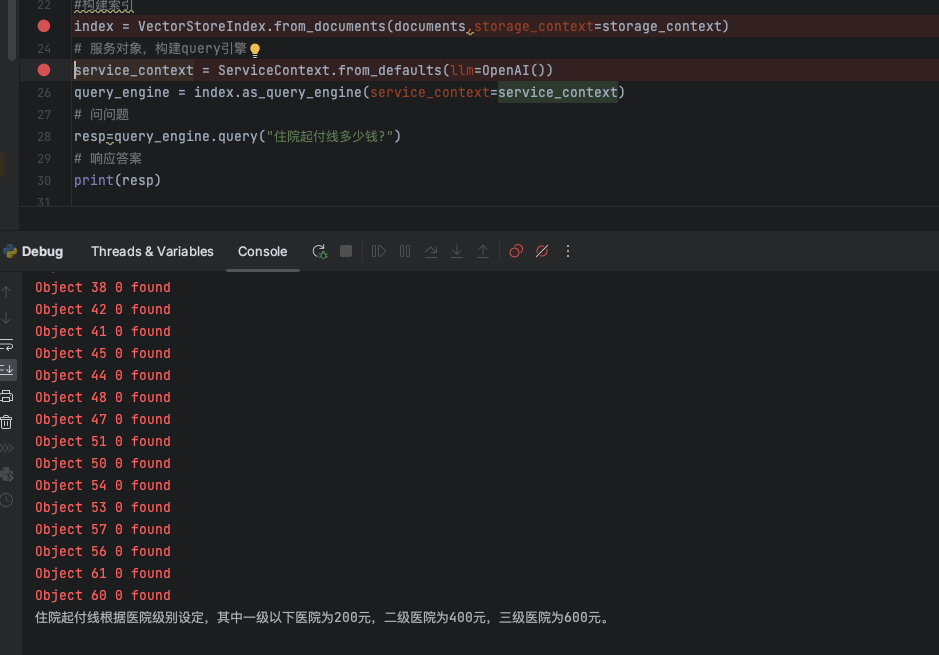
resp=query_engine.query("住院起付线多少钱?")
# 响应答案
print(resp)
2.处理过程
2.1 数据处理过程
在数据处理的过程中,主要包含几个核心的步骤:
- 初始化向量存储引擎,目前向量数据库类型非常多,笔者本机跑了一个es的docker镜像,这里就选择es了
- 读取数据,数据格式包括:PDF、WORD、TXT等等文本数据
- 在数据读取完成后,会对文档内容进行分割,然后Embedding(调用embedding模型)存储入库
2.1.1 处理加载不同的文件类型(构建Document)
SimpleDirectoryReader是llamaindex提供的一个基于文件夹的读取器类,会根据文件夹中的文件扩展后缀类型自动加载数据
主要支持的文件数据类型如下:
DEFAULT_FILE_READER_CLS: Dict[str, Type[BaseReader]] = {
    ".hwp": HWPReader,
    ".pdf": PDFReader,
    ".docx": DocxReader,
    ".pptx": PptxReader,
    ".ppt": PptxReader,
    ".pptm": PptxReader,
    ".jpg": ImageReader,
    ".png": ImageReader,
    ".jpeg": ImageReader,
    ".mp3": VideoAudioReader,
    ".mp4": VideoAudioReader,
    ".csv": PandasCSVReader,
    ".epub": EpubReader,
    ".md": MarkdownReader,
    ".mbox": MboxReader,
    ".ipynb": IPYNBReader,
}


class SimpleDirectoryReader(BaseReader):
    """Simple directory reader.

    Load files from file directory.
    Automatically select the best file reader given file extensions.

    Args:
        input_dir (str): Path to the directory.
        input_files (List): List of file paths to read
            (Optional; overrides input_dir, exclude)
        exclude (List): glob of python file paths to exclude (Optional)
        exclude_hidden (bool): Whether to exclude hidden files (dotfiles).
        encoding (str): Encoding of the files.
            Default is utf-8.
        errors (str): how encoding and decoding errors are to be handled,
              see https://docs.python.org/3/library/functions.html#open
        recursive (bool): Whether to recursively search in subdirectories.
            False by default.
        filename_as_id (bool): Whether to use the filename as the document id.
            False by default.
        required_exts (Optional[List[str]]): List of required extensions.
            Default is None.
        file_extractor (Optional[Dict[str, BaseReader]]): A mapping of file
            extension to a BaseReader class that specifies how to convert that file
            to text. If not specified, use default from DEFAULT_FILE_READER_CLS.
        num_files_limit (Optional[int]): Maximum number of files to read.
            Default is None.
        file_metadata (Optional[Callable[str, Dict]]): A function that takes
            in a filename and returns a Dict of metadata for the Document.
            Default is None.
    """

    supported_suffix = list(DEFAULT_FILE_READER_CLS.keys())
    //....
总共支持了16个文件数据类型,整理到表格如下:
| 文件类型 | 依赖组件 | 说明 |
|---|---|---|
| hwp | olefile | |
| pypdf | ||
| docx | docx2txt | |
| pptx、pptm、ppt | python-pptx、transformers、torch | 用到一些模型,对数据进行理解、提取 |
| jpg、png、jpeg、 | sentencepiece、transformers、torch | 用到一些模型,对数据进行理解、提取 |
| mp3、mp4 | whisper | 用到一些模型,对数据进行理解、提取 |
| csv | pandas | |
| epub | EbookLib、html2text | |
| md | 无 | 本地流直接open,读取文本 |
| mbox | bs4、mailbox | |
| ipynb | nbconvert |
整个Reader类的UML类图设计如下:
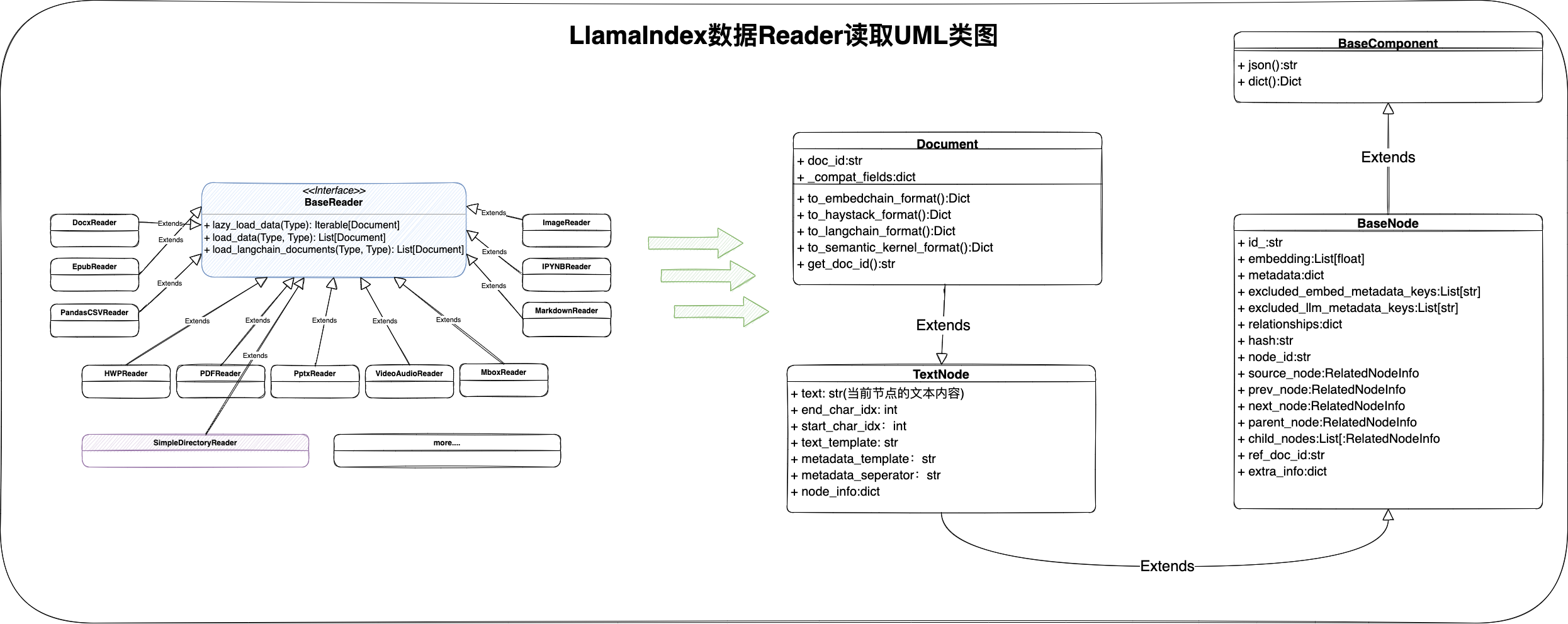
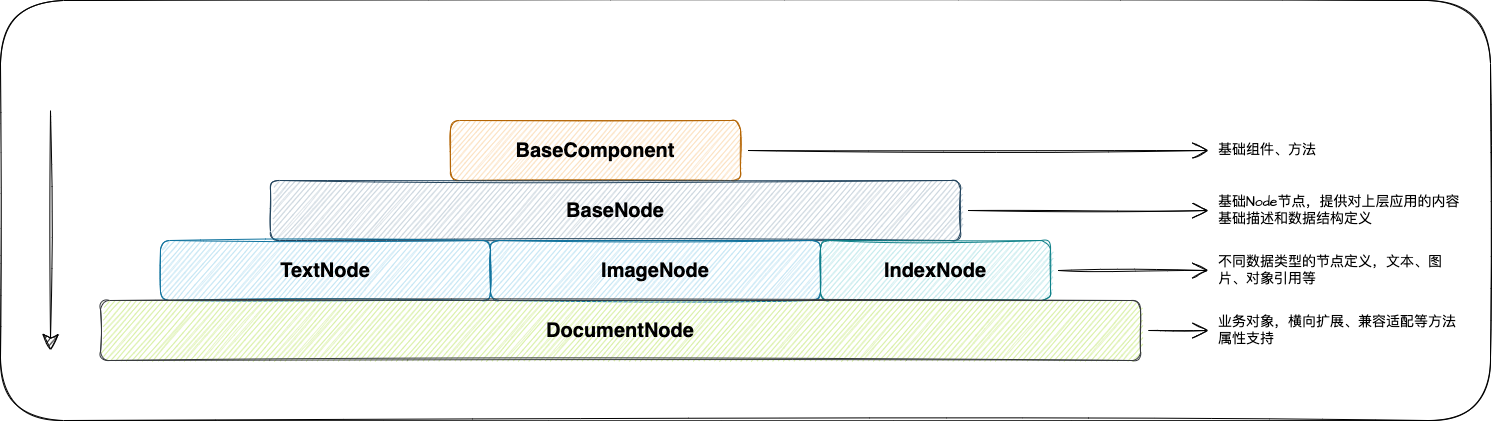
所有文件数据类型的Reader,通过load_data方法,最终得到该文档的Document对象集合,Document类是LlamaIndex框架的处理文档的核心类对象,从该类的结构设计来看,我们可以总结一下:
- 核心字段:id(文档唯一id)、text(文本内容)、embedding(向量float浮点型集合)、metadata(元数据)
- BaseNode提供了一个树结构的设计,对于一篇文档而言,从多级标题划分来看,树结构能更好的描述一篇文档的基础结构
- Document提供了一些外部应用框架适配的方法,比如:LangChain、EmbedChain等等
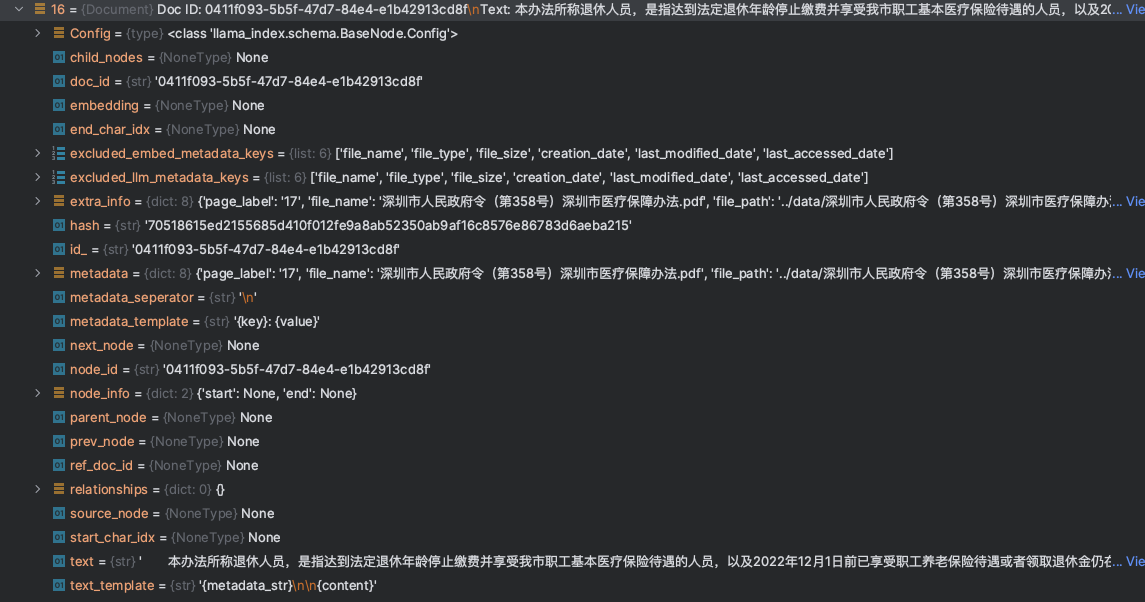
最终构建完成所有的Document信息后,我们可以看到下面一个结构信息
本示例程序,使用的是一个PDF文件,由于我们并未指定分割等策略,LlamaIndex对于PDF文件是以Page为单位,进行切割,最终将所有的Document对象存储进入向量数据库
2.1.2 构建向量数据库索引(Index)
当本地数据集处理完成,得到一个Document集合的时候,此时,这需要构建向量数据库的索引,主要是包含几个过程:
- 调用不同的向量数据库中间件,构建集合索引,对于ES来说,则是创建Index
- 调用Embedding模型(基于OpenAI提供的
text-embedding-ada-002模型),将Document对象集合中的text文本,进行向量化处理并赋值 - 将
Document集合的对象值(text、embedding、metadata)存储进入向量数据库
在LlamaIndex创建ES的向量索引结构中,初始情况下,核心字段也是前面我们提到的Document类中的几个核心字段(id、embedding、content、metadata),如下图:
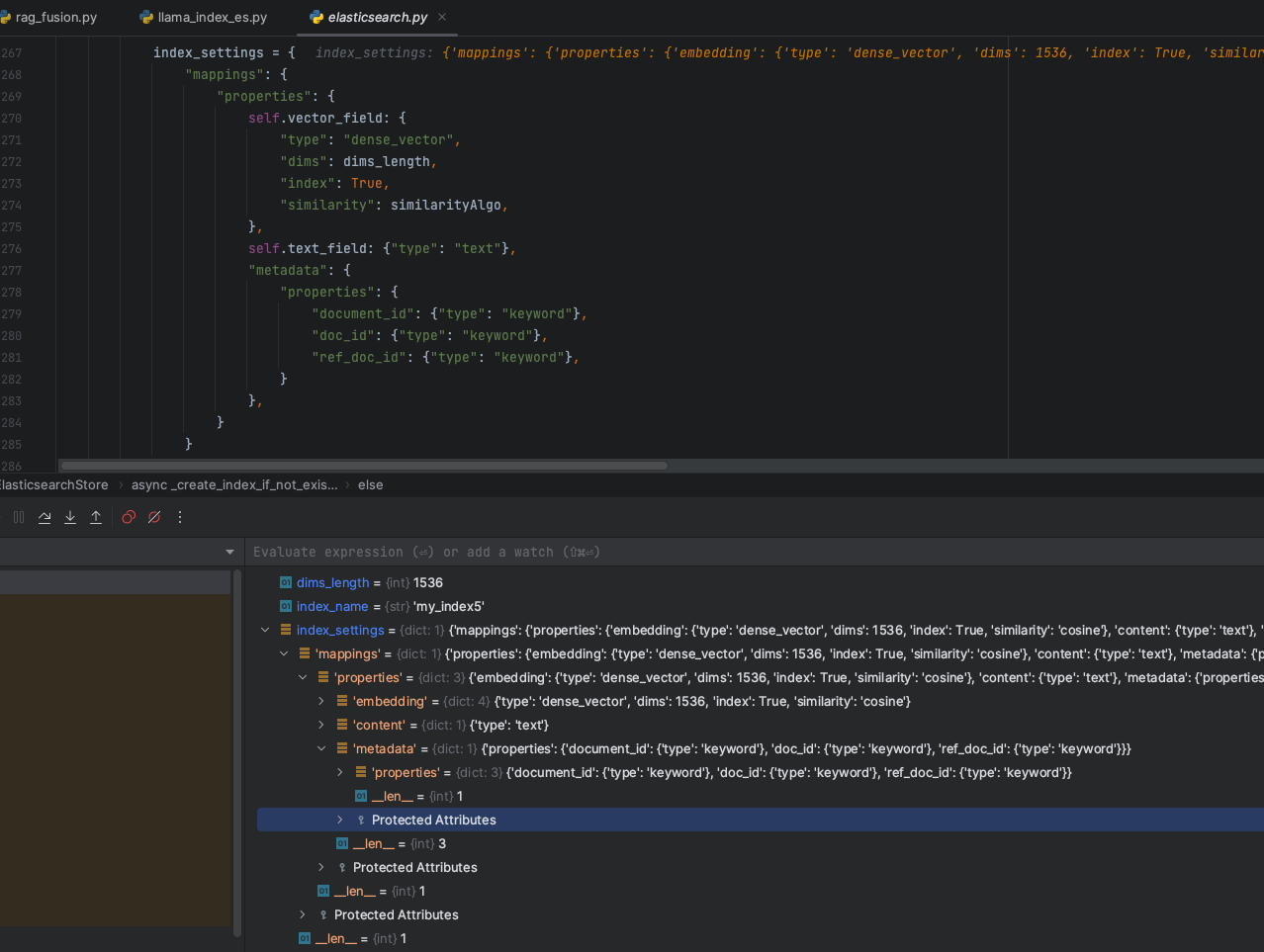
但是在Document对象遍历结束后,在数据存储阶段,考虑到元数据的信息,LlamaIndex会扩充metadata元数据的字段,如下图:
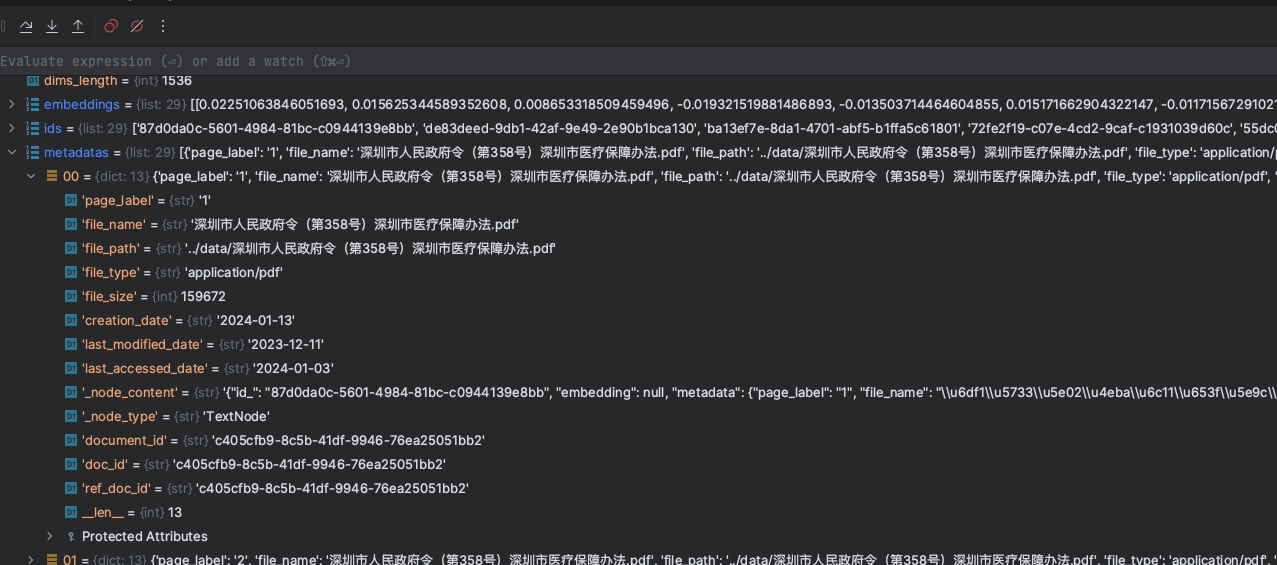
元数据信息会将文档的信息提取出来,包括页码、文件大小、文件名称、创建日期等等信息
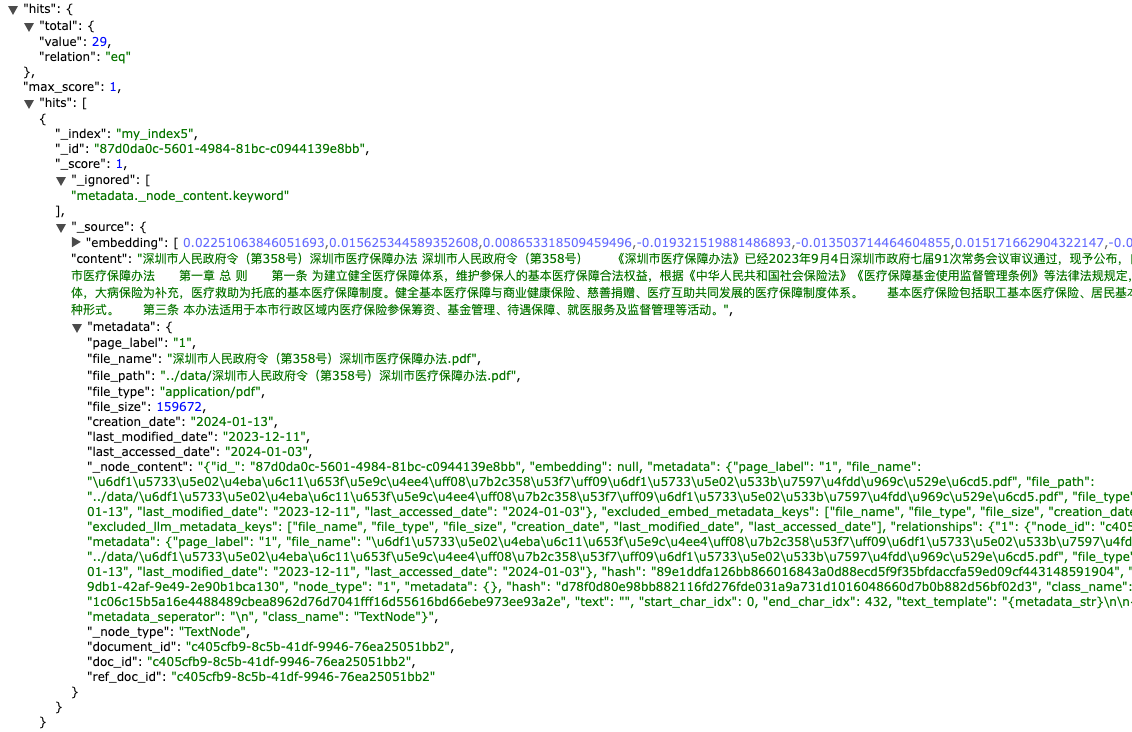
最终在本地数据集的情况下,LlamaIndex创建的ES数据索引结构最终就会变成下面这种结构形式:
{
    "mappings": {
        "properties": {
            "content": {
                "type": "text"
            },
            "embedding": {
                "type": "dense_vector",
                "dims": 1536,
                "index": true,
                "similarity": "cosine"
            },
            "metadata": {
                "properties": {
                    "_node_content": {
                        "type": "text",
                        "fields": {
                            "keyword": {
                                "type": "keyword",
                                "ignore_above": 256
                            }
                        }
                    },
                    "_node_type": {
                        "type": "text",
                        "fields": {
                            "keyword": {
                                "type": "keyword",
                                "ignore_above": 256
                            }
                        }
                    },
                    "creation_date": {
                        "type": "date"
                    },
                    "doc_id": {
                        "type": "keyword"
                    },
                    "document_id": {
                        "type": "keyword"
                    },
                    "file_name": {
                        "type": "text",
                        "fields": {
                            "keyword": {
                                "type": "keyword",
                                "ignore_above": 256
                            }
                        }
                    },
                    "file_path": {
                        "type": "text",
                        "fields": {
                            "keyword": {
                                "type": "keyword",
                                "ignore_above": 256
                            }
                        }
                    },
                    "file_size": {
                        "type": "long"
                    },
                    "file_type": {
                        "type": "text",
                        "fields": {
                            "keyword": {
                                "type": "keyword",
                                "ignore_above": 256
                            }
                        }
                    },
                    "last_accessed_date": {
                        "type": "date"
                    },
                    "last_modified_date": {
                        "type": "date"
                    },
                    "page_label": {
                        "type": "text",
                        "fields": {
                            "keyword": {
                                "type": "keyword",
                                "ignore_above": 256
                            }
                        }
                    },
                    "ref_doc_id": {
                        "type": "keyword"
                    }
                }
            }
        }
    }
}
数据Index定义完成,Document对象存储进入向量数据库,此时,我们的数据集结构如下:
2.2 问答获取答案
在获取答案的过程中,主要包含几个核心的步骤:
- 构建用户查询Query,对query进行Embedding处理,召回Topk的相似片段内容。
- 组装Prompt工程内容,发送大模型获取答案
2.2.1 召回查询获取TopK
首先,在RAG的查询阶段,不管是使用那个向量数据库,根据数据库的类型,将用户的query语句进行Embedding后,再构建数据库的查询条件,如下图:
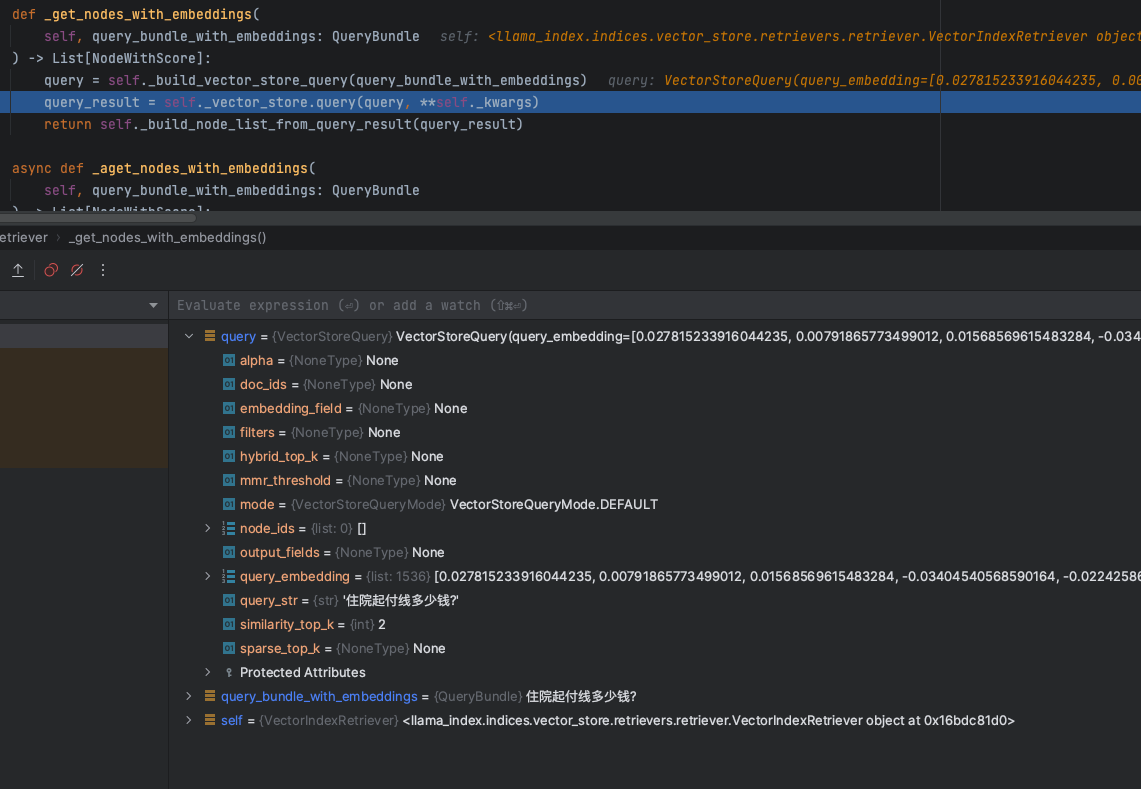
这里面会包含几个核心的参数:
- embedding:knn查询的浮点型向量数组值
- top_k:根据knn相似度查询获取得到的topk值数量,在这个例子中,LlamaIndex默认值是2
- filters:过滤条件
- alpha:语义&关键词混合检索的权重,0代表bm25算法检索,1则代表knn
VectorStoreQuery类结构定义如下:
@dataclass
class VectorStoreQuery:
    """Vector store query."""
    # knn搜索的查询Embedding浮点型数组
    query_embedding: Optional[List[float]] = None
    # knn搜索的top k取值
    similarity_top_k: int = 1
    doc_ids: Optional[List[str]] = None
    node_ids: Optional[List[str]] = None
    query_str: Optional[str] = None
    output_fields: Optional[List[str]] = None
    embedding_field: Optional[str] = None

    mode: VectorStoreQueryMode = VectorStoreQueryMode.DEFAULT

    # NOTE: only for hybrid search (0 for bm25, 1 for vector search)
    alpha: Optional[float] = None

    # metadata filters
    filters: Optional[MetadataFilters] = None

    # only for mmr
    mmr_threshold: Optional[float] = None

    # NOTE: currently only used by postgres hybrid search
    sparse_top_k: Optional[int] = None
    # NOTE: return top k results from hybrid search. similarity_top_k is used for dense search top k
    hybrid_top_k: Optional[int] = None
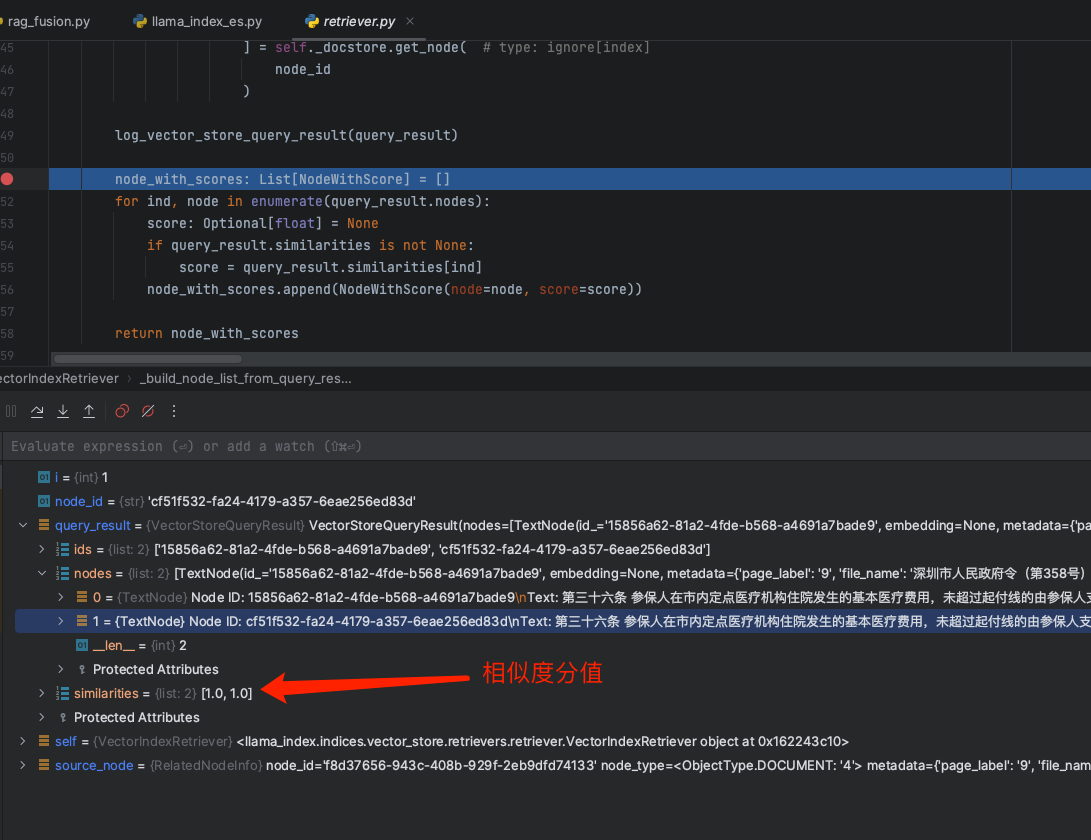
根据query的条件,会从向量数据库中召回获取得到topk的TextNode数组,如下:
2.2.2 构建Prompt发送大模型获取答案
最终召回到引用文档内容后,剩下的就是构建整个大模型对话的Prompt工程,来看看LlamaIndex的基础Prompt是如何构建的
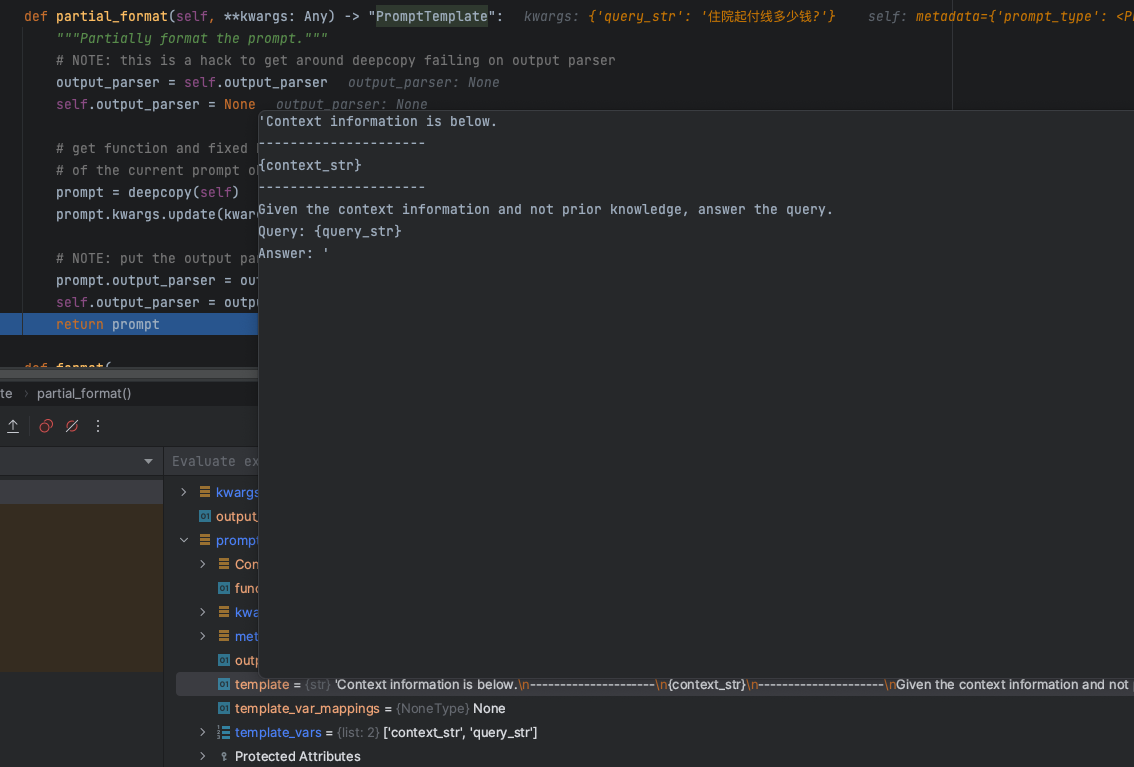
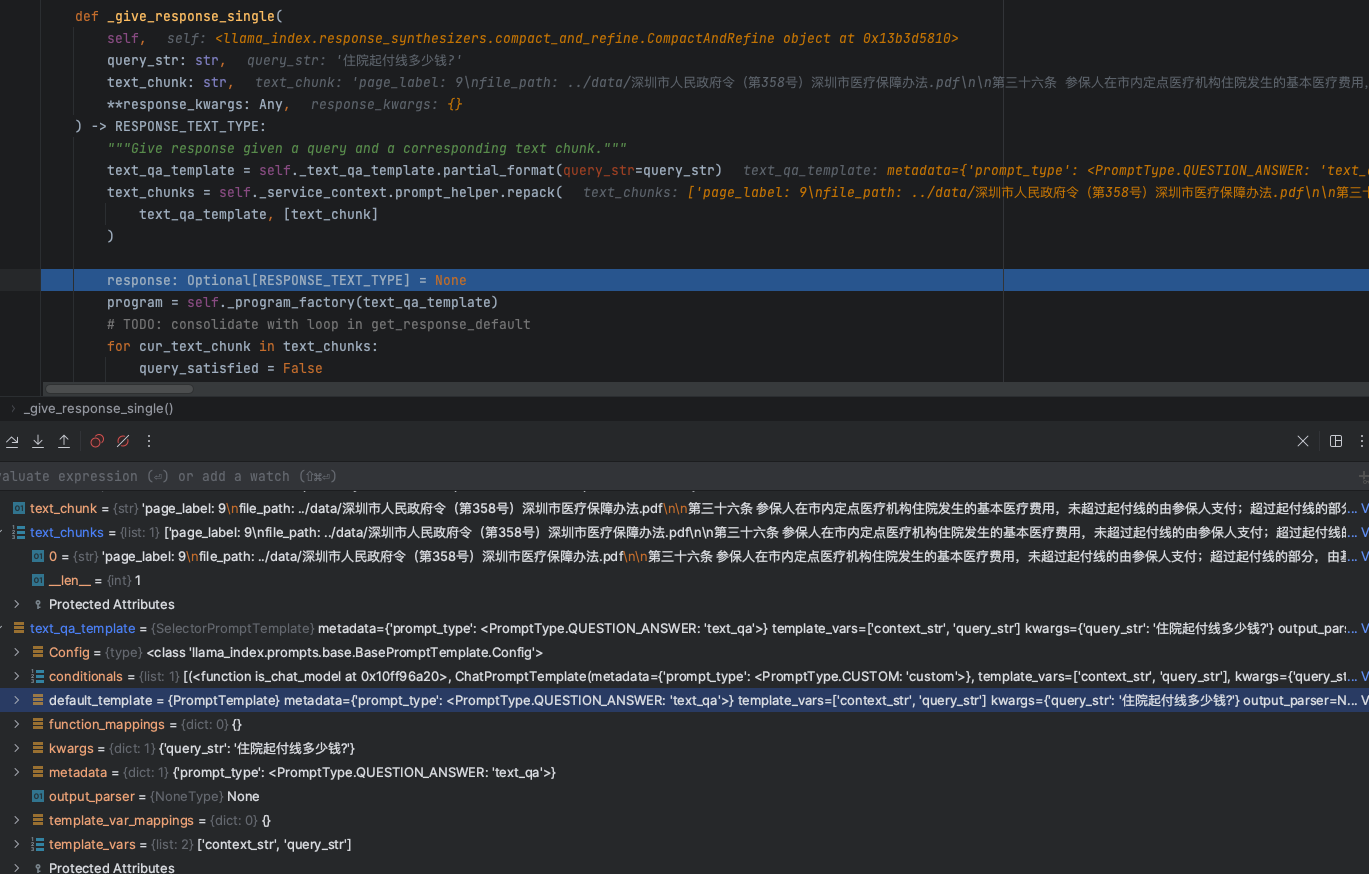
partial_format方法获取得到一个基础的Prompt模版信息,内容如下:
'Context information is below.
---------------------
{context_str}
---------------------
Given the context information and not prior knowledge, answer the query.
Query: {query_str}
Answer: '
这里有两个核心的参数:
context_str: 从向量数据库召回查询的知识库引用文本数据上下文信息,从模版的设定也是告诉大模型基于知识信息进行回答query_str:用户提问的问题
而最终的context_str信息,我们可以看到,如下图:
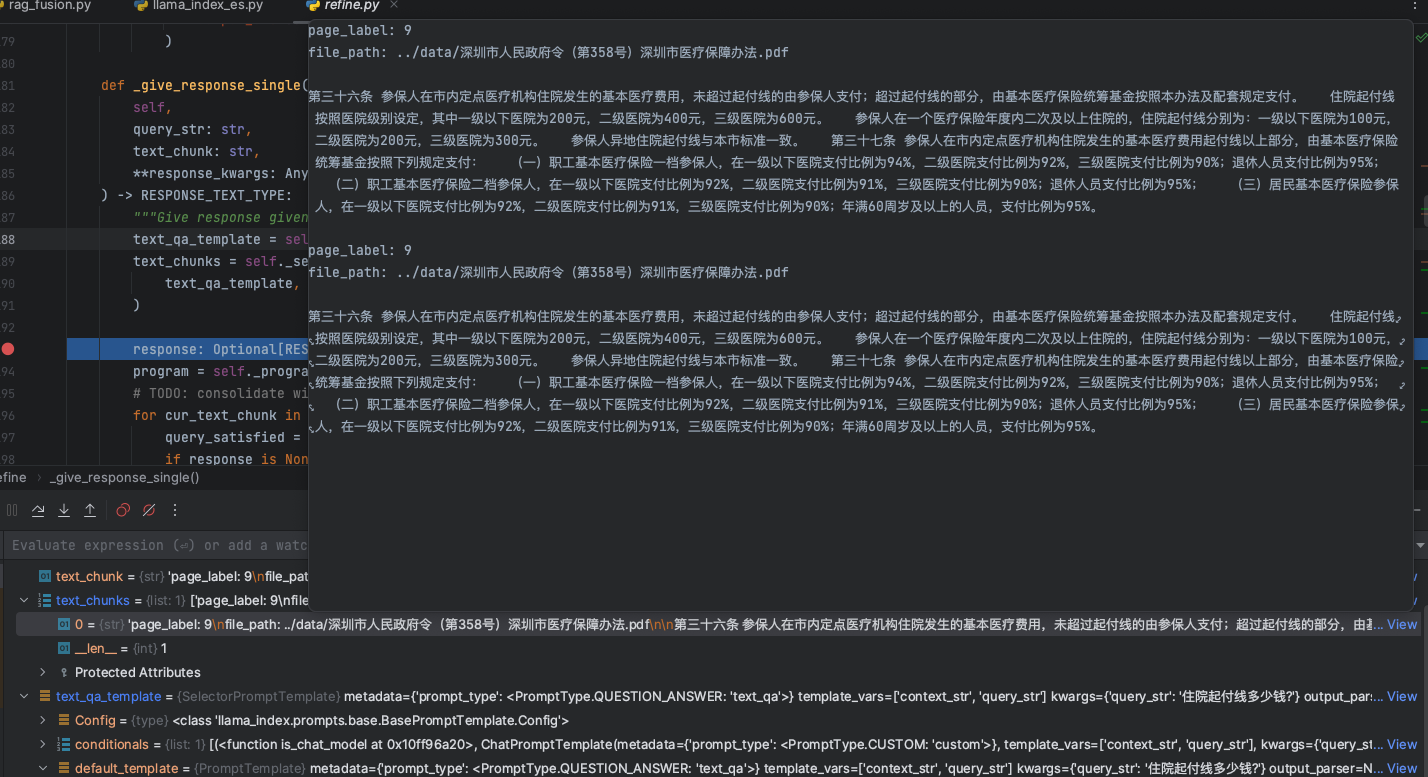
我们的问题是:住院起付线多少钱?
从最终knn检索召回的文档片段来看,精准的找到了知识库的引用内容,此时,交给大模型进行回答,获取我们想要的答案结果。
3.总结
好了,本文从LlamaIndex给我们提供的基础的示例程序,基于Basic RAG的基础架构来分析数据的处理、召回响应等过程,我们可以看到LlamaIndex框架给了我们一个很好的处理流程,从这里我们可以总结如下:
- 对于基础的RAG架构,有一个很好的认知,让开发者知道RAG是一个怎样的处理过程
- 底层的向量数据库存储结构设计和中间程序的结构设计,能够给做RAG应用的开发人员一些启发,流行的RAG框架在数据结构设计上是如何做的,这对于企业开发人员来说,架构&数据结构设计是有很重要的参考意义。